Qwen3.8 27B on 16GB VRAM: RTX 5070 Ti benchmarks
Samuel Batista / October 02, 2026
13 min read • ––– views
I wanted to run Qwen3.8 27B on my RTX 5070 Ti without giving up the long context I need for coding or making the rest of my PC unusable. The original Qwen model and Swift 1.5 ended up almost tied on my coding tests. Swift scored higher on the math sample, with smaller, less certain gains on the financial samples. Bonsai 2 generated text faster and supported much more context.
The context window is how much text a model can work with at once, including files, conversation and its answer. It's measured in tokens, small pieces of text. I got the original model working at 120K tokens, Swift at 112K and Bonsai at 256K. I'd prefer at least 128K, but the two smaller setups let me compare their answers without giving up image support.
Models evaluated in this post
I tested the original Qwen3.8 27B checkpoint alongside these variants. I used compressed model files, often called quants, to fit them on the GPU. The links below lead to their Hugging Face download pages; the file labels identify the versions I tested.
- Qwen3.8 27B base control: Unsloth
UD-IQ3_S, with its matching F16 vision projector. Base settings. - Swift 1.5 Qwen3.8 27B:
IQ3_XXS, with its matching F16 vision projector. Swift settings. - Bonsai 2 27B:
PQ2_0, with its BF16 vision projector and KV-bias calibration file. Bonsai settings. - Bonsai 2 27B CRACK:
PQ2_0. Launch and benchmark instructions.
Those four completed the comparison. I also tried DavidAU Fusion 27B and OrcaSAQ-2-27B, but couldn't include them in these scores. I've explained why they were left out below.
Base Qwen vs. Swift and Bonsai: what the benchmarks showed
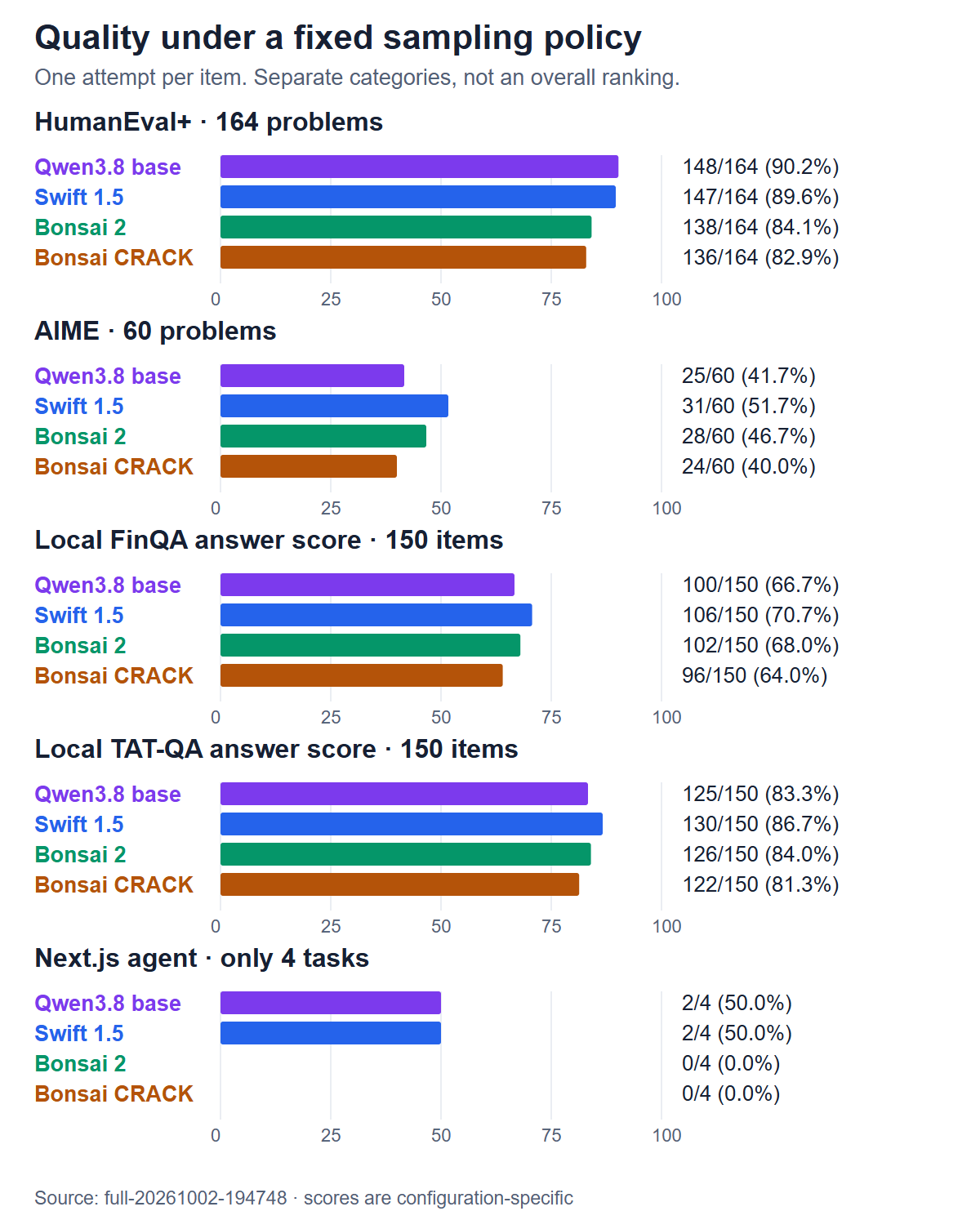
Exact benchmark scores
| Test | Qwen base UD-IQ3_S | Swift 1.5 IQ3_XXS | Bonsai 2 PQ2_0 | Bonsai CRACK PQ2_0 |
|---|---|---|---|---|
| Python coding (HumanEval+) | 148/164 | 147/164 | 138/164 | 136/164 |
| Math (AIME) | 25/60 | 31/60 | 28/60 | 24/60 |
| Next.js coding tasks | 2/4 | 2/4 | 0/4 | 0/4 |
| Financial questions (local FinQA) | 100/150 | 106/150 | 102/150 | 96/150 |
| Financial tables and text (local TAT-QA) | 125/150 | 130/150 | 126/150 | 122/150 |
The original Qwen model passed 148/164 Python problems, compared with 147/164 for Swift. Swift solved three that the base missed, while the base solved four that Swift missed. That's a one-problem difference, not a clear coding advantage for either. Qwen and Swift also passed the same two of four Next.js tasks, while both Bonsai versions passed none. With Qwen and Swift each failing half those project tasks, I wouldn't leave either to code without review.
Swift's clearest advantage was on math: 31/60 problems versus the base model's 25/60. It also got six more FinQA answers and five more TAT-QA answers right, though those smaller financial gaps were less certain. That gives me a reason to consider Swift for math, not to assume it will be better at every task.
For the financial questions, I checked the final answers rather than using the official FinQA and TAT-QA scoring methods. I'm also comparing whole setups here, not just model files: the compression, context sizes and serving software differ.
Bonsai generates answers faster
On short requests, I measured generation speeds of 99.6 tokens per second for Bonsai 2, 53.2 for Swift, 52.5 for the base model and 79.3 for CRACK. The base and Swift were almost tied here too, while Bonsai generated text at about 1.9 times their rate. These rates don't measure the full wait for an answer, and I wouldn't assume they hold with a full context window.
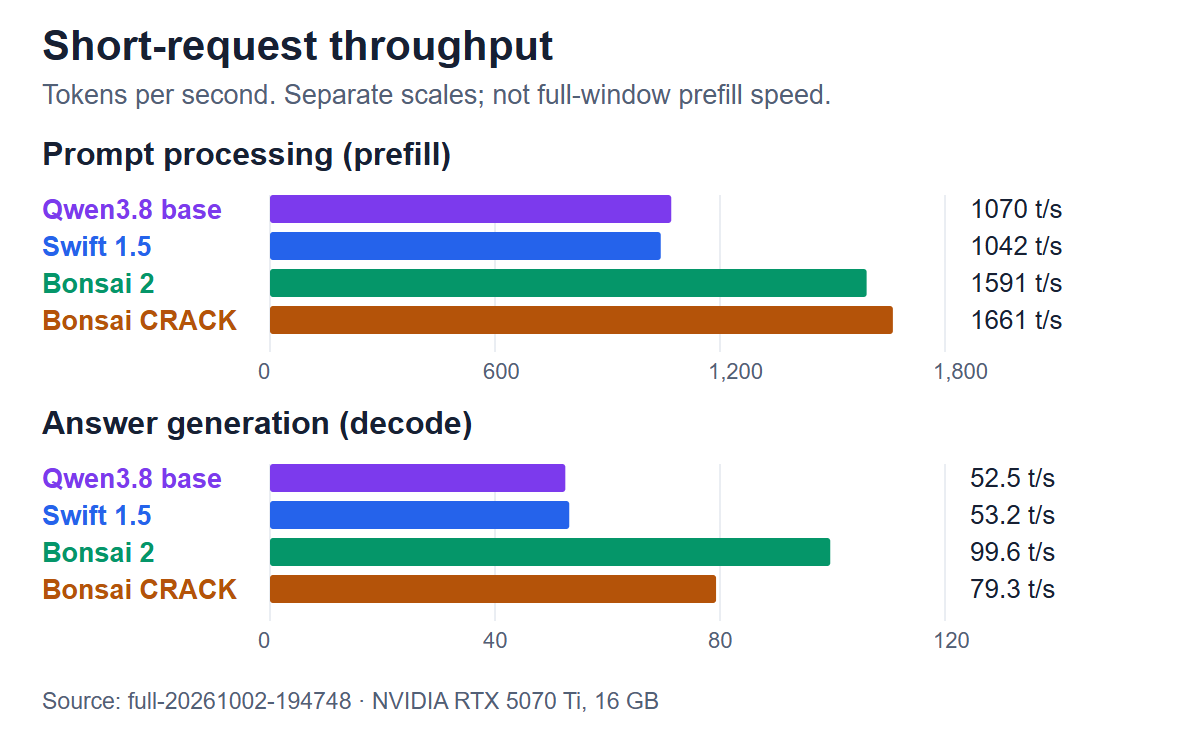
Across the AIME math tests, Swift produced fewer output tokens than both the base model and Bonsai. Its run took 100.4 minutes, compared with 113.8 for the base model and 71.4 for Bonsai, so Bonsai still finished sooner. I didn't find a reason to choose CRACK over ordinary Bonsai in these tests: it generated answers more slowly without doing better on the quality tests.
How much context can they actually use?
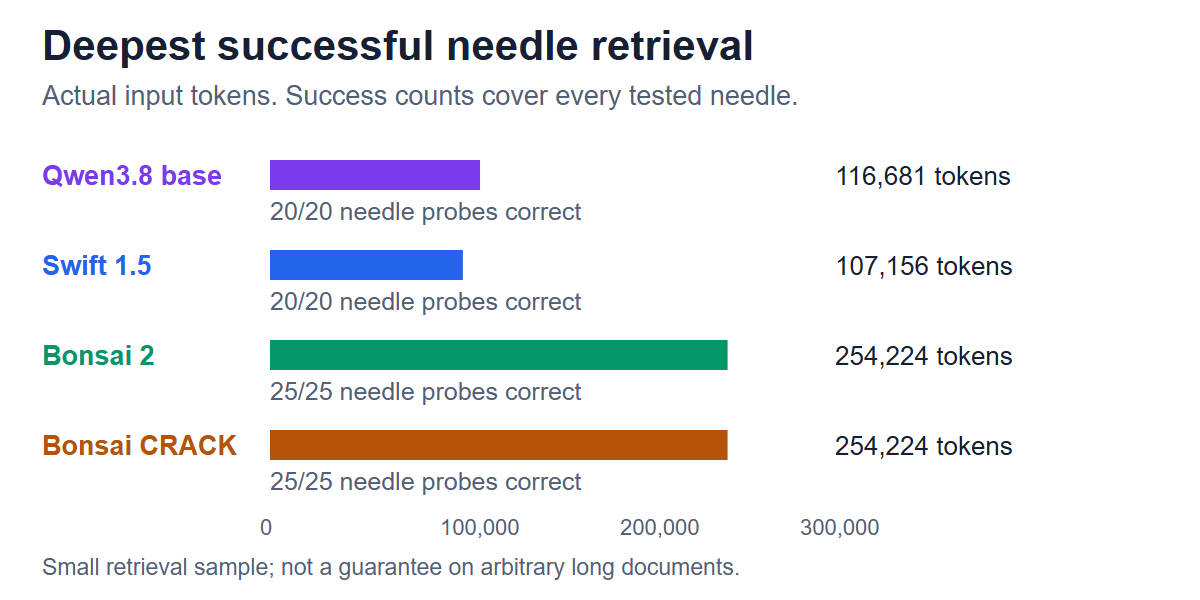
To check whether the models could use that much context, I tested whether they could find facts placed inside long inputs. The base model passed all 20 retrieval tests, reaching 116,681 input tokens. Swift also passed all 20, reaching 107,156 tokens. Both Bonsai setups passed all 25 of their tests, reaching 254,224 tokens.
I also asked them to count how often words appeared and sort words by frequency. None passed the exact counting tests. Swift did better at sorting; the base model and Bonsai versions often wrote explanations instead of the concise answer I asked for. I allowed 220 tokens for each answer, so following the format mattered as well as getting the task right.
I used local RULER-lite tests, not the full official RULER benchmark, and tested each setup up to its own window. That means they weren't all working with the same amount of text. These results show that Bonsai could find facts in a much larger input, not that it could reliably work through an entire codebase.
How I made room in 16GB of VRAM
I switched my monitor from the RTX 5070 Ti to the CPU's integrated graphics, so the NVIDIA card no longer had to spend VRAM driving the desktop. That left its memory dedicated to inference.
Pro tip: moving the cable isn't enough. If your CPU has integrated graphics:
- Move the DisplayPort cable from the NVIDIA card to the motherboard's display output.
- Sign out of Windows and sign back in. This is essential to flush the VRAM held by the previous desktop session.
- Before starting a model, open Task Manager → Performance → your NVIDIA GPU. Look for 0.0 GB dedicated GPU memory usage after signing back in as a quick indication that the setup is working.
The settings below assume that setup; if your NVIDIA card also drives your display, you may need a smaller context window.
I couldn't choose a model just by checking whether its file fit in GPU memory. It also needed room for the context, temporary calculations and image processing. Some settings loaded successfully but left too little memory once I sent a long request.
I set a minimum of 96,000 tokens of context and wanted image support too. Of the 16 configurations in the final comparison, four passed the memory checks and completed the quality tests. The other 12 were excluded, not scored as failed answers, and may still work with smaller windows or different compression.
I measured free memory inside the running server after processing long inputs and images, and required at least 128 MiB left over. I also ruled out settings that kept the CPU near full load, because I still wanted to use the PC while the model was running.
What I left out of the comparison
I was particularly curious about Fusion, but I still don't have a reliable coding comparison for it. IQ2_M at 208K and IQ3_M at 112K both reported no free memory inside the server after a warm-up request. I had run some older benchmarks, but the coding grader was broken, so I can't compare those scores with the results here.
There were a few other reasons I stopped testing particular setups:
- Fusion LOW-MTP-IQ4_XS: my earlier context search stopped at 48K. I dropped that setup because I needed at least 96K, not because it scored poorly on coding.
- Fusion with the output layer on the CPU: this made room for more context, but kept about 30 of my 32 CPU threads busy. I didn't want that cost while using the PC.
- OrcaSAQ-2-27B: the TabbyAPI setup I tried couldn't load its embedding tensor. I never reached quality testing.
- Other Qwen, Ridge and EXL3 presets: they failed the memory check at their tested windows. EXL3 MaxContext passed initially, then ran out of spare memory during a later long-context test.
Fusion IQ2_M and IQ3_M may still work with smaller windows or batches. I haven't ruled that out, and their coding capabilities remain an open question.
Settings for Qwen3.8 27B on the RTX 5070 Ti
The KV cache stores information the model needs from earlier tokens. Compressing that cache saves memory alongside compressing the model. Batch and microbatch sizes control how much input is processed together: larger batches can be faster, but need more temporary memory.
I kept both the model and its matching vision projector, the component that processes images, on the GPU. In the settings below, K means 1,024 tokens.
The original Qwen model: the control
For the base model, I used Unsloth's Qwen3.8-27B-UD-IQ3_S.gguf with mmproj-F16.gguf. This is a compressed version of the original Qwen model, not another fine-tune. I started with Swift's cache and batch settings, then checked how much context would fit in GPU memory with this model file:
Context:      122880 tokens (120K)
KV cache:     q4_0 keys / q4_0 values
Batch:        64
Microbatch:   64
MTP (multi-token prediction): off
The heavier UD-Q3_K_XL file only reached 80K under the corrected memory checks, so I dropped that setup. UD-IQ3_S reached 128K for text, but left only 87 MiB after an image request. At 120K, it processed 114,538 fresh input tokens after an image at about 664 tokens per second, with 265 MiB free and less than one CPU-core equivalent in use.
I used the same custom llama.cpp build as Swift. The control tells me how these two deployed setups compare, but their compression differs, so it doesn't isolate the effect of fine-tuning.
Swift 1.5: the settings I kept
I used Swift-1.5-Qwen3.8-27B-IQ3_XXS.gguf with its matching F16 vision projector:
Context:      114688 tokens (112K)
KV cache:     q4_0 keys / q4_0 values
Batch:        64
Microbatch:   64
MTP (multi-token prediction): off
I ran this on custom llama.cpp b11064/build 9, revision 76a22d8, with added memory reporting. If you use a different build, check memory again before keeping the same context size.
I also tried the larger Q3_K_S quant. It handled a roughly 96K text prompt but left too little memory after an image request. The smaller IQ3_XXS let me use 112K. I tried increasing the batch and microbatch to 128, which processed input faster, but left only 111 MiB after an image, below my 128 MiB minimum. A 120K window failed the memory check too.
With both batch settings at 64, I could process 106,347 fresh input tokens at about 703 tokens per second, even after an image request, with 137 MiB still free. That's only just above my minimum, so I'd check again with your usual desktop apps running and the images you expect to use.
Bonsai 2: the faster option with more context
For Bonsai, I used the official Bonsai 2 27B PQ2_0 release. You'll need the model, its BF16 vision projector and its KV-bias calibration file. It runs on a compatible Prism build, not every GGUF engine. My Bonsai2-Profile.ps1 applies the cache calibration as well as these settings:
Context:      262144 tokens (256K)
KV cache:     q4_0 keys / q4_0 values
Batch:        2048
Microbatch:   512
These models are open-weight: you can download and run them locally, but that doesn't mean their licences permit every use. Check the terms before commercial deployment, particularly Swift's revenue-based licence.
How I ran the tests
I ran one model at a time on Windows, with a Ryzen 9 9950X, roughly 64 GB RAM and the RTX 5070 Ti. I kept generation settings fixed: temperature 0, top-p 1, top-k 1, seed 42 and no extra penalties. The Python coding tests used the official EvalPlus checker.
I enabled thinking only for the AIME math problems, with a limit of 8,192 output tokens for the reasoning and answer. Running out of that budget counted as a failure, so these scores don't tell you what the model might solve with more time. I also can't rule out benchmark questions having appeared in training, and I didn't test how reliably the models avoid hallucinations.
Try the settings on your own GPU
The launchers, tuning scripts and evaluation harness are in my LocalAI repo. It's very much a vibe-coded mess, but it's been a useful one to me, so I'd like to share it with the world. It's Windows-oriented today. I'd love to rewrite it completely in Bun to make it easier to run on other platforms.
If you want to repeat this, start with the setup instructions in README.md and the model-specific notes in docs/models/. You'll need to download the weights separately and install the right runtime; the Swift results above used my custom build.
Once the model files and runtimes are in place, you can start Swift from PowerShell in the repo folder:
.\scripts\Start-Qwen38-Headless.ps1 -Variant Swift15Iq3xxs -LogVerbosity 4
For the original model, use the same launcher with the base variant:
.\scripts\Start-Qwen38-Headless.ps1 -Variant BaseIq3s -LogVerbosity 4
Or, for Bonsai:
.\scripts\Start-Bonsai2-Headless.ps1 -LogVerbosity 4
For the CRACK variant, add -Crack to the Bonsai command.
Run one at a time. Before comparing answers, check that the model can handle your input:
- Send long files and images you'll actually use. Leave enough context space for the answer.
- Check memory after several requests of different lengths. One successful prompt wasn't enough to catch every memory problem I found. Watch CPU use too.
- Measure input the server hasn't already cached. I required at least 500 tokens per second on long, fresh inputs. Check the length with the model's own tokenizer, since different models split text differently.
- Keep the comparison consistent. Use the same tasks, generation settings and answer limits, and record the model files and software versions.
To repeat the benchmark suite, follow infrastructure/eval/README.md to set up the evaluator and check which configurations pass on your machine. Then stop any manually started server and use the controller to run only the profiles that passed. If all four pass, the command is:
.\scripts\Restart-ModelEvals.ps1 -Profiles qwen-base-iq3s,swift15-iq3xxs,bonsai-262k,bonsai-crack
Don't pipe that command's output or start another model alongside it. To stop the run, use Restart-ModelEvals.ps1 -Force -StopOnly.
Made with GPT-6.1 Sol, Bun, Python, llama.cpp, EvalPlus and Docker.